How many apps did your team open before lunch today? Why does it matter?
If the answer is more than three, chances are they spent a chunk of that morning not working, but navigating. Flipping between tools. Re-entering context. Searching for a file that definitely exists somewhere. Chaos is expensive, whereas connected workspaces are cheaper.
The problem is rarely the tools themselves. Your team does not need another app. They need the current ones to finally behave like teammates. And it’s more straightforward than most people expect.
Why Integration Matters in Modern Workplaces
Fragmentation is sneaky. It doesn’t announce itself as a productivity crisis. It starts with tiny delays, repeated conversations, and decisions slowed by data hiding in the wrong system. Over time, the cost becomes enormous.
When your digital workspace tools actually share data, something shifts. Your team stops being reactive, constantly chasing what they need, and starts being deliberate. Communication informs tasks.
Key Components of an Integrated Digital Workspace
What does a truly integrated digital workspace look like?
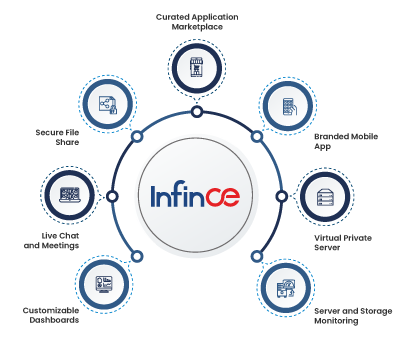
A fully integrated digital workspace combines communication, collaboration, tasks, and business applications into a single interconnected system. Using the appropriate integrated productivity tools allows teams to minimize the time spent switching between platforms and maximize the time spent on valuable work.
Unified Communication
Work should not feel like a relay race between apps. Infince brings chat, meetings, email, and documents into one connected workspace. This allows your team to move faster with less friction.
Collaborative Productivity Tools
Version 1, Version 2, Version 2 final. Version 2 final ACTUAL. Does that sound familiar?
That is what happens when collaborative productivity software is not actually collaborative. Infince’s productivity suite gives your team real-time editing, proper version control, and secure external sharing with password protection and expiration controls. A good workspace saves time. A great one saves time and energy.
Task Management and Dashboards
Most teams are not overwhelmed by work. They are overwhelmed by disconnected work. Infince’s task manager keeps ownership clear, surfaces overdue tasks, and flags risks early. Custom dashboards deliver live, role-based views, so every team sees what matters and acts faster.
App Marketplace
Every business depends on a unique set of tools and platforms to manage operations. An integrated app marketplace makes it easier to deploy CRM systems, help desk platforms, eCommerce applications, and even open-source tools without complex development or lengthy IT involvement.
Data Security
As organizations bring multiple applications into one environment, maintaining data security becomes critical. A secure digital workspace offers features such as dedicated virtual private server (VPS) hosting, role-based access controls, and end-to-end encryption to protect sensitive business information.
Common Challenges When Building a Digital Workspace
Building an integrated digital workspace appears straightforward until underlying inefficiencies begin to emerge. Many organizations find that the true difficulty lies not in incorporating additional tools but in achieving collaboration among people, systems, and data.
- Tool sprawl is usually the first surprise. Most organizations have no idea how many active subscriptions they’re running until someone actually counts. Your workflow should feel connected, not stitched together with hope.
- Resistance is cultural, not technical. People don’t resist bad tools. They resist uncertainty. Early wins matter enormously here. One workflow that visibly improves is worth a hundred slide decks explaining the vision.
- Data silos are expensive in ways that don’t show up on any invoice. When the Sales team doesn’t know what the Support team knows, blind spots grow and decisions slow. That’s a connectivity failure, not a people failure.
- Security gaps open up when governance is treated as a phase two problem. More connections mean more exposure if access controls aren’t built in from the start. Infince handles this through private cloud architecture and built-in role-based access, so security isn’t something you add later. It’s already there.
Best Practices to Build a Digital Workspace with Integrated Productivity Tools
These digital workspace best practices aren’t theoretical. They’re what make a digital workspace that sticks. Rather than one that gets quietly abandoned six months after launch.
1. Audit Before You Add Anything
You likely have more tools than you realize. Chart your actual usage, identify the overlaps, and build based on reality rather than on what was purchased with good intentions two years prior. The goal is not a bigger stack. It is a smarter one.
2. Single Sign-On is Non-Negotiable
Every extra login quietly steals time your team never gets back. This is one of those digital workspace best practices that pays back immediately and keeps paying.
3. Choose a Platform, Not a Patchwork
The best productivity tool is a workplace that finally makes sense. Infince is designed as a unified environment from the start – data flows naturally, IT manages one system, and users learn one interface.
4. Govern From Day One
Role-based access, audit logs, data controls – these are not optional. These are what make an integrated digital workspace safe to scale, particularly in industries where data handling is a regulatory requirement, not just a best practice.
5. One Workflow First, Then Expand
Resist the urge to integrate everything simultaneously. Pick the process causing the most pain. Fix it properly. Work flows faster when your tools stop working against each other.
How Productivity Tools Power an Integrated Workspace
Each category of integrated productivity tools carries a specific load in a well-designed workspace.
- Communication tools eliminate repetition. When chat, video, and email are connected, context travels with the conversation. Nobody has to recap what was said somewhere else.
- Collaborative productivity software keeps work moving in one direction. Real-time editing and proper version control mean teams co-create instead of colliding over conflicting versions of the same file.
- Task tools create shared accountability. When a task update automatically triggers a notification or calendar entry, the manual follow-up chase disappears. Work just moves.
- Dashboards put the right picture in front of the right person. Managers see progress. Owners see performance. Everyone sees what matters to them, without hunting for it across three different reports.
- An app marketplace is what makes it all extensible. Digital workspace tools like CRM, help desk, and project platforms become part of one connected environment rather than a collection of disconnected subscriptions your team merely tolerates.
When your integrated productivity tools work as one, the gains aren’t dramatic and sudden. They accumulate every single day.
- Productivity that compounds
- Teams feel supported rather than stretched
- One platform replaces fragmented multi-vendor subscriptions
A Look at the Future Trends of Digital Workspace
AI-powered workspaces:
The next generation of digital workspaces will go beyond automation and become proactive collaborators for employees. AI-powered systems will be able to anticipate user needs, surface relevant information, automate repetitive workflows, and provide intelligent recommendations without constant manual input. This will help teams work faster, reduce operational friction, and improve decision-making across departments.
Usage-based pricing:
Businesses are increasingly moving away from rigid licensing models and adopting usage-based pricing for workplace platforms and digital tools. Instead of paying for large software suites with underutilized features, organizations can scale costs based on actual usage, users, or workloads. This creates a more cost-efficient and flexible digital workplace strategy while allowing businesses to adapt technology investments as needs evolve.
Infince – One Secure Platform To Cut The Chaos
Disconnected tools create exhausted teams. A properly integrated digital workspace, built on the right integrated productivity tools and grounded in solid digital workspace best practices, changes how your team experiences work. Not dramatically on day one. But meaningfully, and consistently, over time.
How does Infince make this happen?
Infince is a one-of-a-kind enterprise application cloud platform that helps deploy productivity tools and apps from a single ecosystem.
- No chaos with single sign-on convenience
- Enhanced data security with a private cloud server
- Seamless integration
- Centralized management, and
- Enhanced productivity
Infince brings it all together. One secure platform. Communication, collaboration, task management, dashboards, and a growing app marketplace. Request a free demo now!