With remote and hybrid workplaces becoming the new norm, video meetings have become the default mode of workplace collaboration. But are they productive enough to power streamlined collaboration among remote teams? That’s something to think about!
The ground reality is that around 35-71% of business meetings are considered unproductive. 72% of the time, the issue is technical glitches. The technology that was supposed to simplify collaboration has created new layers of complexity. Blame scattered tools and fragmented experiences.
As a post-pandemic reaction, several companies have built their core collaboration medium around video calls and online meetings. Although the huge investment in sophisticated tools and apps, the lack of integration and unified capabilities often hampers productive video meetings. The solution does not lie in investing in more tools, but in improving the capabilities.
This blog will help you understand why video meetings break down and how to fix them with the right technology. Read on!
The Cost of Inefficient Video Meetings on Team Productivity
75% of employees believe their organization’s current remote work tools and technology require upgrades. Yet only 37% of companies upgraded their video meeting tech. The numbers tell a harsh story about how broken video meetings have become. But beyond statistics, there’s a daily operational cost that most organizations fail to account for. Every inefficient meeting doesn’t just waste an hour. It derails focus, fragments workflows, and creates ripple effects that impact productivity long after the call ends.
Why Video Meetings Break Down
Some of the common reasons why productive video meetings don’t happen are:
- Tools don’t connect smoothly. This means people are forced to switch between apps for scheduling, chatting, and sharing files. This constant juggling diverts attention away from the discussion.
- Poor audio or video quality interrupts the flow. Participants talk over each other as a result. Background noise from home offices adds more distraction.
- There’s also a lack of shared context or an agenda between meeting participants. Without easy access to prior notes or action items, participants restart discussions that have already been done. This leads to a dip in productivity.
Simple Fixes to Make Video Meetings Work Better
- Start with integrated tools that handle everything in one place. These systems link scheduling, video calls, and follow-up notes automatically. No more app-switching.
- Choose platforms with strong basics like clear audio, stable video, and screen sharing that everyone sees at once. Test connections before calls to spot problems early.
Key Elements That Makes Video Meetings Truly Effective
Teams need tools that reduce friction in video meetings. Separate apps for calendars, notes, and sharing create extra work. A unified platform that brings a suite of apps together is what hybrid and remote teams want. This enables clear communication, effective collaboration, and easy follow-ups. For instance, Infince’s productivity apps make this simple for hybrid teams.
Here are some key features you should be looking at to make your video meetings more effective:
Integrated Calendar and Scheduling
Imagine booking a meeting without a trail of email chains. For effective video meetings, integrated calendar and scheduling is a key ingredient. They collate information on each team member’s availability and suggest open slots. Employees can pick a time, add details, and send out invites instantly. Overlapped meetings shows up right away, making it easier to reschedule and avoid conflicts. In addition links to drives and documents can be attached to the meeting invites for more transparency. Meeting invitees get automatically notified. This keeps everyone on the loop instantly without delays or hindrance.
Real-Time Collaboration and Notes
Features like live notes enhance meeting collaboration. Productivity is increased when meeting notes can be taken down immediately and everyone can collaborate on it instantly. Meetings can be turned into actions abruptly with clearly stated deadlines. Interactions via chat stay within contexts of the meeting space. This enables quick discussions, leading to enhanced collaboration.
Screen Sharing and Recording
Having a screen-sharing feature allows team members to collaborate on the go, without lag. Participants highlight or draw on the shared view in real time. Recording the session with one click helps for future reference. Employees may use playback features that include audio, video, and shared screens. This also helps eliminate unnecessary and redundant meetings. Employees can also use meeting transcripts to pull out key quotes for quick searches.
Built-In Collaboration Features vs. Standalone Video Tools
Typically, tech teams toggle between apps for document edits, task tracking, and video meetings. Context switching accounts for significant time loss, says Gartner insights. Infince, with its integrated meeting tool addresses this with native/built-in collaboration efficiency.
Here is how built-in collaboration boosts productivity as opposed to standalone video tools:
How Infince’s Productivity Apps Improve Video Meeting Outcomes
Infince’s productivity apps embed enterprise-grade features into a unified platform. With features such as a collaborative intranet, app integrations, and custom workflows, these integrated meeting tools deliver enhanced video meeting outcomes. Here’s how:
Single-Sign-On Convenience
Infince has robust Single Sign-On (SSO). This eliminates silos! One click grants access to video conferencing, scheduling, real-time notes, and dashboards. For tech teams, it means enhanced data security, with role-based permissions (e.g., view-only for guests). Multi-factor authentication ensures adequate security without slowing workflows.
Seamless Integration with Tasks, Notes, and Chats
Infince’s productivity marketplace connects a wide number of tools. During meetings, drag-and-drop widgets parse discussions into structured notes, auto-tagging action items, and syncing to task boards. Real-time collaboration happens on the go. While you’re discussing project updates in a video call, team members can simultaneously edit shared documents, update task statuses, and post questions in integrated chat channels. Everything stays within the same workspace without context switching.
Curated App Marketplace
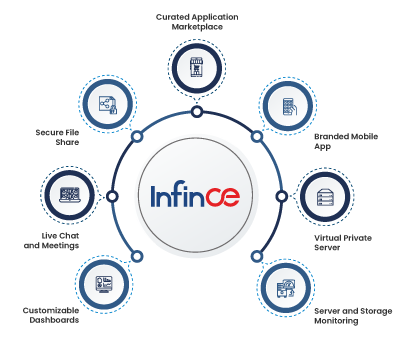
Infince provides instant access to curated apps and tools, including open-source and commercial business software. The marketplace includes project management platforms, HR management systems, accounting tools, and more.
What makes this different from typical app stores is that it’s easy to deploy. You can quickly integrate them within a single secured cloud environment for unified operations.
Communication Boards
Infince’s Communication Boards act as a centralized dashboard and live feed where teams and groups can share company updates, event announcements, articles, and important discussions in one place. By keeping everyone aligned and informed on a single platform, it ensures meeting participants have access to the same context and information — making video meetings more focused, productive, and action-oriented.
Built for Remote and Hybrid Teams
Infince works perfectly well to suit both remote and hybrid workplace environments. The mobile-friendly experience ensures hybrid teams and remote workers have the same capabilities. Multiple screen sharing and simultaneous document editing make online meetings and presentations more interactive. Teams collaborate on documents in real time while discussing changes on video. This parallel workflow eliminates the back-and-forth that is typical of meetings.
Best Practices to Get More Value from Infince Video Meeting Tool
To make your virtual meetings truly effective, it’s important to fully utilize the features built into your collaboration platform. Here are some practical best practices:
- Use Communication Boards for Context: Share updates, documents, and pre-reads on communication boards before meetings so everyone joins with the same background information.
- Leverage Multiple Calendar Views: Use flexible calendar viewing options. Track schedules clearly to stay organized, and never miss important meetings or deadlines.
- Streamline Event & Meeting Coordination: Plan meetings with multiple participants alongside company events and deadlines. Easily check everyone’s availability to prevent overlaps and improve attendance.
- Integrate Calendars with Meeting Links: Use calendar-meeting integration to auto-generate meeting links, reminders, and updates — reducing manual follow-ups.
- Adopt Centralized Scheduling: Schedule meetings from a single platform to avoid scattered invites and double bookings.
- Encourage Easy Collaboration During and After Meetings: Share files, assign tasks, and post updates within the same platform to keep discussions actionable and organized, while ensuring data safety.
Read more: Digital Workplace Platform to Enhance Video Meeting Engagement
Conclusion: Elevate Your Team’s Collaboration With the Right Tools
The gap between productive video meetings and time-wasting sessions comes down to two things: process and technology. They both have to work together.
Scattered tools create friction that kills productivity. When the calendar doesn’t integrate well with the video platform, every meeting becomes a coordination challenge. Your team wastes energy managing tools instead of focusing on work that matters.
Integrated meeting platforms eliminate this chaos. This transforms how teams collaborate.
For organizations ready to fix their meeting culture, the path forward is clear.
- Start measuring what matters.
- Track attendance, completion rates, and meeting costs. These metrics surface problems you can actually solve.
- Then invest in tools that work as a unified system.
Infince’s productivity platform delivers exactly this integration. One login connects your entire meeting workflow from scheduling through follow-up. Built-in collaboration features keep discussions productive. The app marketplace extends functionality without adding complexity.
Explore Infince today and improve your video meeting infrastructure. Unlock your team’s full productivity potential. Request a demo today.