Companies today face intense competition, and there is no two-way about it. Staying ahead means getting more done with few resources. While organizations continue to invest in recruitment, training, and workplace infrastructure, many are still unable to justify the costs. They do not see consistent improvements in outcomes.
That’s where employee productivity becomes a critical factor.
However, employee productivity is not just about working faster or longer hours. It depends on something deeper —workforce engagement. When employees feel connected to their work and motivated to contribute, they naturally perform better. They take initiative, solve problems proactively, and deliver higher-quality results. Disengaged employees, on the other hand, do the bare minimum and therefore do not add value.
This blog explores why employee engagement matters, what disengagement can typically cost organizations, and what practical strategies leaders can execute to rebuild it.
Why Is Employee Productivity a Key Driver of Sustainable Growth?
Today’s modern businesses are aware that real productivity is when employees feel connected to the organization they work for and contribute meaningfully toward its growth.
Employee productivity shapes everything from revenue growth to market position. When teams work efficiently and stay focused on high-value tasks, companies can scale faster without proportionally increasing headcount. This operational leverage becomes especially important during expansion phases or economic uncertainty.
Three factors are critical in this regard:
- Growth and Revenue: Productivity directly fuels growth by enabling teams to handle more work with existing resources. A sales team that closes deals faster can pursue more opportunities in the same timeframe. A product development team that ships features efficiently can enter new markets quickly. This means companies can increase output and revenue without the linear cost of hiring proportionally more people. For enterprise organizations, this translates to better margins and faster response to market opportunities.
- Innovation: Engaged and productive employees are always on the lookout to innovate because they have a conducive environment to think out of the box and problem-solve. When employees aren’t bogged down by inefficient processes, they can identify more productive ways of working. A productive engineering team might automate repetitive tasks, freeing up time for strategic projects.
- Retention: Productivity influences retention in ways that are not exactly obvious. Employees who feel productive and accomplished are more likely to stick around, reducing costly turnover and preserving institutional knowledge. When people see their work making an impact and moving forward smoothly, they feel valued and motivated. Conversely, employees stuck in unproductive environments grow frustrated and directly contribute to attrition rates.
Why Work Engagement Matters?
The cost of disengagement in enterprise environments runs deeper than most leaders realize. Beyond annual productivity losses, there are hidden costs such as:
- Projects miss deadlines because disengaged team members don’t follow through.
- Quality suffers when people do the minimum required.
- Customer satisfaction drops when unmotivated employees provide lackluster service.
- Team morale deteriorates when disengaged employees create friction.
These ripple effects compound over time, making disengagement one of the most expensive yet overlooked drains on enterprise performance.
How Is Compliance Different From Learner Engagement?
Work engagement is, by definition, the emotional and cognitive connection employees have with their work and organizational goals. It is not just about complying with organizational goals and expectations. Compliant employees do what’s asked and nothing more. They attend meetings but don’t contribute ideas. They finish assignments on time but don’t flag potential issues early. They follow processes even when those processes are clearly broken.
Most concerning is that compliance can mask disengagement for months or even years. Surface-level metrics look fine—tasks get completed, deadlines get met—but the organization slowly loses its competitive edge.
Engagement, however, is about doing above and beyond what’s required; bringing energy, ideas, and ownership. It is when employees care about the why, not just the what. This distinction matters because compliant employees maintain the status quo while engaged employees push the organization forward.
What Does a Highly Engaged Workforce Bring to the Table?
While a compliant workforce can run operations, only an engaged one can innovate, adapt, and compete in a fast-changing environment. Engagement fuels that extra bit of creativity, collaboration, and resilience that no policy or process can enforce. It’s the difference between employees who clock in and those who buy in to the organization’s purpose.
How Work Engagement Helps Adapt to a Changing Work Ethos
Today’s workplaces are shaped by three major shifts in the way they operate. Engagement plays a central role in navigating each one successfully.
Hybrid and remote work: Teams spread across distributed locations require higher levels of intrinsic motivation. Work engagement matters more in hybrid and remote setups and engaged employees thrive in this environment because they don’t need constant supervision. They set their own pace, communicate proactively, and stay connected to team goals despite physical distance. Disengaged employees, however, become invisible in remote settings. They attend video calls with cameras off and may slack in their responses to calls and messages.
Purpose-driven roles: Today’s workforce consists of employees who are aware of their responsibility toward their work, and they want it to matter beyond just generating profit. They look for roles where they can see their impact and feel their contributions align with personal values. Engagement strengthens when people understand how their daily tasks connect to meaningful outcomes. A customer service representative who sees how their work improves user experiences stays more engaged than one who simply closes tickets.
Automation and AI: As routine tasks become automated, human work shifts toward complex problem-solving, creativity, and relationship building. These areas require genuine engagement to succeed. You can’t automate someone into being creative or building strong client relationships. Engaged employees adapt to this shift naturally because they’re already thinking beyond just completing tasks. They see automation as freeing up time for more interesting work rather than threatening their relevance. Organizations with high engagement levels adapt to technological change faster because their people actively participate in the transformation rather than resisting it.
Common Challenges in Cultivating Workforce Engagement
Despite the clear benefits of having an engaged workforce, many organizations struggle to build and sustain it. Here are some common challenges:
Siloed teams
When there is no shared goal or collaboration, it creates the first major obstacle. When departments operate in isolation, employees lose sight of how their work fits into the bigger picture. A marketing team might launch campaigns without understanding product roadmap priorities. Finance might enforce policies that slow down sales without realizing the impact. This disconnect drains engagement because people can’t see the value of their contributions beyond their immediate task list.
Lack of recognition
This is a quiet motivation drainer. Employees who consistently deliver results but receive no acknowledgment start questioning whether their efforts matter. Recognition doesn’t require elaborate programs or big budgets. Sometimes a simple acknowledgment in a team meeting or a direct message thanking someone for solving a difficult problem makes the difference. When it’s entirely absent, even top performers start doing the minimum.
Outdated tools
This creates daily frustration that compounds into disengagement. Employees that have no choice but to use clunky systems spend more time dealing with tech challenges rather than doing meaningful work. A sales team using a slow CRM loses productivity hours on data entry instead of building client relationships. A remote team struggling with unreliable video conferencing misses the spontaneous collaboration that builds engagement. When tools hinder rather than help, people disengage from their work and the organization.
Unclear goals
Without clarity on priorities or how their work connects to business outcomes, people drift. They spend time on tasks that seem important but don’t actually move the needle. This ambiguity breeds frustration and disengagement because employees want to feel their work matters.
Remote and hybrid isolation
This adds another layer of complexity. Distributed work offers flexibility but removes the informal interactions that build connection. There’s no casual coffee chat to bounce ideas around. No walking to a colleague’s desk to quickly resolve a question. These small moments matter more than most leaders realize. Without them, remote employees can feel invisible, working in isolation without the social bonds that sustain engagement over time.
Strategies to Drive Work Engagement; In Turn Productivity
Addressing the above-mentioned challenges requires conscious effort. The following are useful strategies to drive workforce engagement:
- Set clear and aligned goals: Employees need to understand not just what they’re doing, but how it matters for the organization’s larger goals. A software engineer writing code should know how that feature helps the company enter a new market or solve a customer problem. A customer service representative handling tickets should see how their work improves retention rates. This connection between daily tasks and business outcomes creates purpose. When people understand the impact of their work, they naturally invest more energy and attention into doing it well.
- Encourage continuous professional development and skill development: LinkedIn Learning’s research shows that 94% of people would stay at a company longer if it invested in their learning and development.” People want to grow by acquiring new skills and putting it into practice. This doesn’t mean offering a random catalog of training courses. It means creating clear learning paths that help people build skills relevant to their current role and future aspirations. A junior analyst should see how they can develop into a senior role. A team lead should understand what capabilities they need to become a department head. When organizations make growth accessible and personalized, engagement is a given!
- Provide modern tools for communication and collaboration: Distributed teams need digital infrastructure that makes collaboration feel natural, not forced. Real-time chat should work reliably. Video calls shouldn’t drop constantly. Project dashboards should show everyone what’s happening without requiring status update meetings. Shared documents should let multiple people work simultaneously without version control nightmares. When tools remove friction instead of creating it, teams stay connected and productive regardless of where people physically sit. The right technology becomes invisible—people focus on work instead of wrestling with systems.
- Create a culture of recognition: Recognition doesn’t require formal programs or big budgets. It requires consistency and sincerity. Acknowledge good work when you see it. Call out specific contributions in team meetings. Send a direct message thanking someone for handling a difficult situation well.
- Give people autonomy and the power of decision-making: It’s a no-brainer; micromanagement kills engagement faster than almost anything else. People want to feel empowered and not controlled in how they accomplish their work. Trust teams to make decisions within their areas of responsibility. Let them experiment with different approaches to solving problems. When employees have ownership over their work, they take pride in outcomes and stay more invested in success.
Digital Workplace Platforms: How They Work to Drive Work Engagement and Productivity
The right digital workplace platform does more than being a toolkit of sorts. It provides ways to address and potentially remove the friction that causes disengagement in the first place. Here’s what Infince offers:
Centralized access to everything employees need
Infince’s centralized platform means employees can find documents, project updates, and team discussions without switching between five different applications. Role-based access ensures people see what’s relevant to their work without getting overwhelmed by information that doesn’t apply to them. This clarity and easy access directly translates to better productivity.
Real collaboration, not just coordination
Regardless of location, Infince offers employees access to an integrated, collaborative work experience through integrated chat, file sharing, and project dashboards that update in real time. Teams can have quick conversations, share files securely, and track progress without scheduling another meeting. Task dependencies become visible so everyone knows what needs to go next. Role-based dashboards (individual, team, and department-level) create transparency across the organization, making it easier to align efforts and spot issues early on.
Mobile-friendly apps that enhance communication
Engagement drops when employees can’t access what they need outside traditional office hours or locations. Mobile apps that work as well as desktop versions keep people connected without chaining them to a desk. A sales representative can update client information immediately after a meeting. A manager can approve requests while traveling. Remote team members stay engaged because they have the same access and capabilities as office-based colleagues.
Knowledge sharing that builds institutional memory
When knowledge stays locked in individual heads or buried in email threads, organizations lose efficiency and newer employees struggle to get up to speed. Infince, as a comprehensive digital workplace platform, makes knowledge sharing simple and helps teams document processes, capture lessons learned, and build a searchable repository of institutional knowledge. This reduces repeated questions, speeds up onboarding, and ensures best practices spread across the organization.
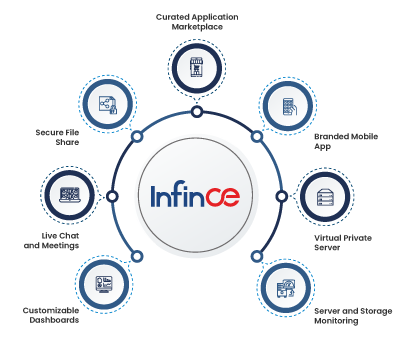
Infince combines communication, work management, and knowledge sharing into a single cost-efficient scalable solution. Hosted on virtual private servers, Infince helps enterprises lower operating overhead, keep cash flow, and retain profitability.
As an organization wanting to elevate employee engagement and productivity through modern digital workplace solutions, Infince provides a complete platform that is customizable to help unleash collaboration, motivation and performance.
Are you ready to future-proof your workplace?
Experience how Infince can transform your organization—schedule a demo today.