Modern workplaces do not suffer from a lack of tools, rather they suffer from overcrowding of tools. There are so many SaaS apps, on-prem applications, VPNs, virtual desktops, and collaboration platforms that are used on a daily basis. For most users, an average workday begins with trying to log in, reset forgotten passwords, and figuring out where work actually happens.
When there are too many tools involved and data exchange between them disconnected, it creates friction. That friction slows people down and frustrates IT teams equally. This phenomenon is referred to as workspace sprawl.
But, all hope is not lost. A Unified Workspace can bring order to this chaos. It provides a single, secure place to access everything they need, right from apps, desktops, and data while removing the complexity of handling them.
In this guide, we’ll break down what a Unified Workspace really is, why your team needs it, and how it can help your organizations deliver a better and secure work experience.
What is a Unified Cloud Workspace?
A Unified Cloud Workspace is a secure, centralized digital environment that gives users access to all their work applications, desktops, data, and tools from a single interface.
In simple terms, it’s one place where work happens, regardless of whether employees are working in an office or remotely, what device they use, or which apps they need. Instead of switching between multiple portals, VPNs, and logins, users sign in once and get everything they’re authorized to access.
Unified Cloud Workspace Vs. Traditional Work Environments
Traditional work environments were built for a time when employees were working from a dedicated physical office, used standard company-issued devices, and used a limited number of approved applications. These applications often had distinct identities and required users to maintain separate usernames and passwords.
As a result, application access was fragmented causing frequent access issues. Further, when a new application had to be accessed, the IT team had to be called in to set up access before the application can be used. This often results in operational delays.
On the other hand, a Unified Workspace replaces this patchwork approach with a centralized, identity-driven workspace that supports modern work styles. The difference becomes clear when you compare them side by side.
| Aspect | Traditional Work Environment | Unified Cloud Workspace |
|---|---|---|
| Access control | Multiple logins, VPNs, and portals | Single sign-on with one secure entry point |
| Application access | Apps spread across on-prem, cloud, and local installs | All apps delivered from one centralized workspace |
| User experience | Inconsistent and often confusing | Seamless and consistent across users and devices |
| Device dependency | Tied to corporate-owned devices | Device-agnostic (BYOD, remote, thin clients) |
| Security controls | Perimeter-based and hard to enforce | Identity-driven, Zero Trust-based access |
| IT management | Disconnected tools and manual processes | Centralized visibility and control |
| Scalability | Slow and resource-intensive | Fast, flexible, and cloud-ready |
Traditional work environments slow down productivity and operational velocity because they were never designed for scale, mobility, or flexibility. Employees waste time troubleshooting access issues, while IT teams spend hours managing endpoints, patching systems, and responding to security gaps.
A Unified Workspace removes these bottlenecks by centralizing access and simplifying how work gets done while balancing control or security.
Core Components that Make Up a Unified Cloud Workspace
A Unified Workspace isn’t a single tool, instead it’s an ecosystem of tightly integrated components that work together to deliver secure, seamless access. Each component plays a specific role, but the real value comes from how they’re unified under one access and management layer.
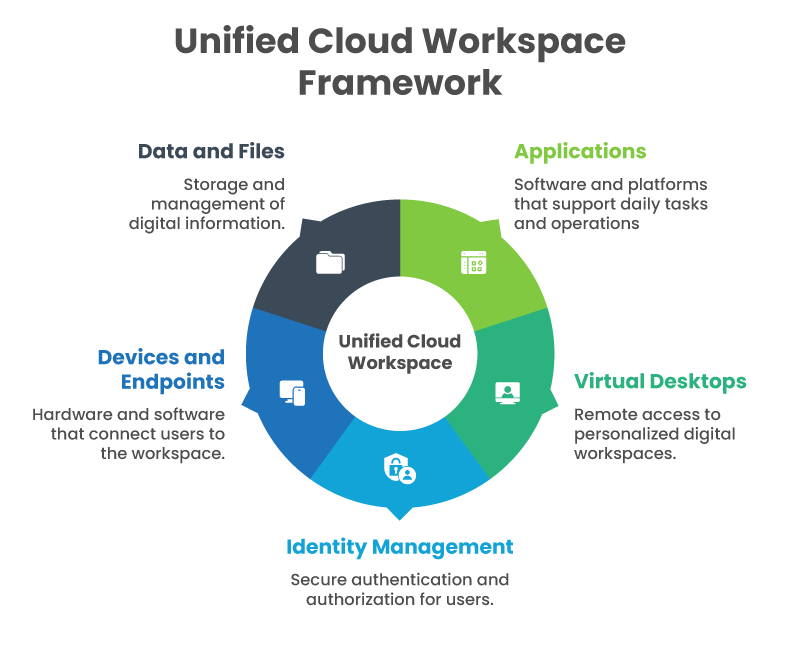
Applications (SaaS, Open Source, Web, and Legacy Apps)
Modern teams rely on a mix of cloud-based SaaS tools, internal web apps, and legacy applications to run day-to-day operations. A Unified Workspace brings all of these together in one place, regardless of where they’re hosted. Users access everything through a single interface, while IT teams avoid the complexity of managing separate delivery methods for each app type.
Virtual Desktops and Remote Access
Virtual desktops provide secure, centralized computing environments that users can access from anywhere. Within a Unified Workspace, desktops and apps are delivered without exposing corporate data to local devices. This is especially useful for remote workers, contractors, and regulated environments where security and control are critical.
Identity and Access Management
Identity sits at the core of a Unified Workspace. Instead of relying on network location or device ownership, access is based on who the user is and what they’re allowed to do. Role-based access, multi-factor authentication, and contextual policies ensure users get the right access at the right time—nothing more, nothing less.
Devices and Endpoints
Unified Workspaces are device-agnostic by design. Employees can work securely from laptops, tablets, thin clients, or even personal devices without compromising security. There is no restriction on the operating system of these devices as well. Further, since apps and data remain centralized, IT teams reduce risk from lost, stolen, or unmanaged endpoints while still supporting flexible work styles.
Centralized Data and Files
Data is the most valuable asset in any organization. A Unified Workspace keeps files and data centralized, protected, and accessible only to authorized users. Instead of storing sensitive information on local devices, users interact with data securely within the workspace, making it easier to enforce policies, prevent data loss, and meet compliance requirements.
Why Use a Unified Cloud Workspace?
The way we work has changed permanently, but many IT environments haven’t kept up. In a modern workspace, a Unified Workspace isn’t just a nice-to-have. It is a must-have tool that can help tackle the structural challenges modern organizations face as work becomes more distributed, digital, and security-sensitive.
1. The shift to distributed and hybrid work
Remote and hybrid work are no longer exceptions; they’re the default for many teams. Employees now use a combination of work from home, coworking spaces, client sites, or even while traveling.
Traditional office-centric systems cannot accommodate these modern needs, whereas a unified workplace is built for it. By centralizing access and decoupling work from physical locations, organizations can support flexible work while maintaining control.
2. Tool sprawl and its complexity
Most companies did not build their current tool stack on purpose. It evolved over a period of time, one tool or one platform at a time. New apps were added to solve immediate problems, resulting in multiple platforms, logins, and access methods.
For users, this resulted in a downstream effect of constant context switching and password fatigue. IT teams became burdened with the pressure of managing a growing number of tools, integrations, and permissions.
A Unified Workspace solves for both these complexities acting as a single access layer, reducing complexity for both users and administrators.
3. Security and compliance challenges
As tools, platforms, and endpoints increase, it significantly enlarges the attack surface that can be targeted for security vulnerabilities. When access is scattered across VPNs, local installs, and unmanaged devices, enforcing consistent security policies becomes nearly impossible.
A Unified Workspace centralizes security around identity and access, making it easier to apply Zero Trust principles, monitor activity, and protect sensitive data.
4. Employee experience as a business priority
The essence of productivity is in removing friction from everyday work. When employees can access everything they need through one secure workspace, they spend less time troubleshooting and more time getting real work done. Organizations that prioritize a Unified Workspace are enabling employees to become productive workers who get more done with less effort.
How a Unified Cloud Workspace Works
A Unified Workspace works by unifying all access and application data storage on the cloud. We can break down its working into three layers:
- Centralized access model
- Identity-driven model
- Cloud and virtualization foundation
Centralized access model
A unified workspace allows users to sign into a unified dashboard where all authorized applications, desktops, and resources can be accessed. There’s no need to individually access each application, remember multiple URLs or switch between portals. The unified entry point becomes the starting point for the entire workday, making access simple and predictable.
Identity-driven access
Access decisions are based on identity, not location. A Unified Workspace uses role-based and context-aware policies to determine what each user can access. Factors like user role, device type, location, and time of access all come into play. This is Zero Trust in action—every request is verified, and access is continuously evaluated instead of assumed.
Cloud and virtualization foundation
Applications and desktops are hosted centrally in the cloud or data center and streamed securely to users. Since data never lives on the endpoint, organizations reduce the risk of data loss while still giving employees a fast, responsive experience—no matter where they’re working from or what device they’re using.
Key Features of a Unified Cloud Workspace
The core features of a unified workspace are designed to streamline workflows, reduce context switching, enhance collaboration, strengthen security, and improve overall productivity. The features apply uniformly across office, remote or hybrid work environments.
Single sign-on (SSO)
Single sign-on allows users to authenticate and gain access to all authorized applications and resources using a single identity. This eliminates the need to manage multiple usernames and passwords, reducing password fatigue and login-related support tickets. For IT teams, they can link user identities using a SSO makes it easier to enforce authentication policies consistently across the entire environment.
App and desktop virtualization
App and desktop virtualization allow applications and full desktops to be delivered securely from a centralized environment. Users interact with their apps as if they were running locally, while data and processing remain in the cloud or data center.
Device-agnostic access
Unified Workspaces are designed to work across devices. Employees can securely access their workspace from laptops, tablets, thin clients, or personal devices without IT needing to manage every endpoint. This enables true BYOD support while keeping corporate apps and data isolated from personal environments, reducing risk from lost or unmanaged devices.
Built-in security controls
For unified workplaces, security is built-in by design and is not an afterthought. Security controls like access policies, multi-factor authentication, and continuous session monitoring are enabled by default to have fundamental defenses in place. Additional security features like data loss prevention, clipboard control, and endpoint protection help prevent sensitive information from leaking outside the workspace.
Centralized management and monitoring
From an IT perspective, everything is managed from a single console. Administrators can provision users, assign apps, monitor sessions, and enforce policies from a single unified dashboard. This centralized visibility makes it easier to troubleshoot issues, respond quickly to threats, and to ensure compliance across users, apps, and devices.
Virtual Private Server (VPS)
A Virtual Private Server adds another layer of flexibility and isolation within a Unified Workspace. Dedicated virtual servers can host applications, desktops, or workloads that require custom configurations or higher performance. By integrating VPS resources into the unified environment, organizations get the benefits of dedicated infrastructure without sacrificing centralized access, security, or manageability.
A unified workspace has numerous benefits for both end users and companies. Let’s take a closer look at how end users can benefit from using a unified workspace in their daily operations.
Benefits for End Users
A Unified Workspace removes daily friction from how people get work done. Instead of adapting to IT systems, users get an environment that adapts to how they work.
Benefits for End Users
A Unified Workspace removes daily friction from how people get work done. Instead of adapting to IT systems, users get an environment that adapts to how they work.
Simplified work experience
Since users get everything from apps to files and a virtual desktop in one place, it removes the probability of multiple failed transactions. This consistency reduces confusion and makes the workday feel more structured and easier to work through.
Faster access to work resources
In a traditional environment, users will have to allocate access to work resources one-by-one. VPN issues and troubleshooting was the norm. However, with a unified workplace, users can log in and immediately access resources from anywhere. IT teams can also create onboarding kits and resources for each project separately to exercise better control.
Flexibility and mobility
With a unified workspace, work can move freely without the shackle of device or location. Users can work securely from home, the office, or on the road, and switch between devices without losing access or productivity.
Augmented productivity
When access just works smoothly, productivity follows. Users spend less time dealing with login issues, permissions, or missing tools and more time focusing on meaningful work.
Benefits for Companies
While users enjoy simplicity, unified workplaces give organizations control, security, and operational efficiency.
Stronger security posture
A Unified Workspace centralizes access control around identity, making it easier to enforce security policies consistently. Since apps and data remain centralized, the risk from unmanaged or personal devices is minimized. Security becomes proactive instead of reactive.
Lower IT complexity and costs
Managing fewer tools means fewer integrations, fewer licenses, and less administrative overhead to own and handle. IT teams can streamline infrastructure, reduce support tickets, and spend more time on strategic initiatives instead of day-to-day firefighting.
Faster employee onboarding and offboarding
New hires can be productive on day one with preconfigured access based on their role and needs. Similarly, when employees leave or change roles, access can be revoked immediately from a single console, reducing security risks and compliance gaps.
Better compliance and governance
Centralized policies make audits and reporting far easier. IT teams can demonstrate who accessed what, when, and from where without having to pull data from multiple systems.
Scalability for growing teams
As organizations grow, the Unified Workspace scales with them. Adding new users, applications, or even entire locations doesn’t require re-architecting the environment. Scalability is easy, fast, and secure.
Unified Cloud Workspace Use Cases
A Unified Workspace adapts well across industries and team structures, making it relevant for a wide range of scenarios.
|
Remote and Hybrid Workforces
Distributed teams get secure, consistent access regardless of location. IT maintains control, while employees enjoy flexibility without compromise. |
Contractors and Third-Party Users
External users can be granted limited, role-specific access without exposing core systems. When contracts end, access is revoked instantly, reducing risk. |
|
Call Centers and Task Workers
Locked-down, role-based workspaces ensure employees only access what they need. This improves security while simplifying training and support. |
Highly Regulated Industries
Industries like finance, healthcare, and government benefit from centralized control, auditability, and strong data protection—without sacrificing usability. |
Unified Cloud Workspace vs. Digital Workspace vs. VDI
Although these terms are often used interchangeably, they’re not the same and mean different things.
Let’s understand them better.
Unified Cloud Workspace vs. Digital Workspace
Both aim to improve employee experience, but their scope differs. A digital workspace typically focuses on aggregating apps and collaboration tools. A Unified Workspace goes further by integrating identity, access control, security, desktops, and data into a single, cohesive platform. Security and governance are integrated and foundational and not considered optional.
Unified Cloud Workspace vs. Traditional VDI
The primary utility of a traditional VDI is delivering virtual desktops. While useful, it has limited scope and is often complex to manage. A Unified Workspace builds on virtualization but goes beyond desktops to include apps, identity-driven access, device flexibility, and Zero Trust security.
| Aspect | Digital Workspace | Traditional VDI | Unified Workspace |
|---|---|---|---|
| Primary Focus | User experience and app aggregation | Virtual desktop delivery | Secure, end-to-end work access |
| Access Model | App portals and collaboration tools | Desktop-centric access | Single entry point for apps, desktops, and data |
| Identity Integration | Basic identity and SSO | Limited or external IAM | Identity-driven, Zero Trust-based access |
| Application Support | Mostly SaaS and web apps | Apps inside virtual desktops | SaaS, web, legacy apps, and desktops |
| Desktop Delivery | Not included | Core capability | Optional, integrated capability |
| Device Flexibility | Limited BYOD support | Often optimized for managed devices | Fully device-agnostic (BYOD-friendly) |
| Security Approach | Add-on or tool-dependent | Perimeter-based | Built-in, policy-driven security |
| Data Protection | Depends on endpoint controls | Data stays in data center | Centralized data with granular controls |
| IT Management | Multiple tools required | Complex infrastructure management | Single console, centralized control |
| Scalability | Moderate | Resource-intensive to scale | Cloud-native and highly scalable |
| Best For | Improving access to modern apps | Desktop virtualization use cases | Modern, distributed, security-focused teams |
When It Makes Sense to Adopt One
A Unified Workspace is especially valuable if your organization supports remote or hybrid work, relies on multiple applications and access methods, or struggles with security and IT complexity. It’s also a strong fit for growing teams that need to scale quickly without constantly reworking their infrastructure.
Key Questions to Ask Before Choosing a Unified Cloud Workspace
Before committing to a platform, ask the right questions:
- Can it unify apps, desktops, and data without adding complexity?
- Is security identity-driven and built in by default?
- How easy is it to onboard and offboard users?
- Will it scale as your team and application stack grow?
Answering these questions upfront helps ensure your Unified Workspace investment delivers long-term value—for both users and IT teams.
How Infince Enables a Unified Cloud Workspace
Infince is built from the ground up to remove complexity from modern IT environments while giving organizations full control over access, security, and user experience. Instead of stitching together multiple tools, Infince delivers a true Unified Workspace through a single, integrated platform.
Unified access from a single platform
Infince unifies applications, virtual desktops, and data into one secure workspace. Users can sign in once to instantly access everything they’re authorized to use. There is no need to use VPNs, multiple portals, or manual workarounds to access applications or edit resources. Whether it’s SaaS apps, internal web apps, or legacy systems, Infince delivers them through a consistent, streamlined experience.
Zero-trust security built in
Infince follows Zero Trust principles by validating every access request based on identity and context. Role-based policies, multi-factor authentication, and continuous verification ensure users only get access to what they need, when they need it, reducing risk without adding friction.
Simplified IT operations
From an IT perspective, Infince replaces sprawl with simplicity. A centralized management console allows teams to provision users, assign apps, enforce policies, and monitor activity from one place. Automation reduces repetitive tasks like onboarding and offboarding, freeing IT teams to focus on strategic initiatives instead of daily maintenance.
Designed for modern work
Infince is purpose-built for today’s work models. It supports remote and hybrid employees, contractors, and third-party users without requiring separate setups or exceptions. Teams get secure access from anywhere, while organizations maintain consistent control and visibility across their entire workforce.
Getting Started with a Unified Cloud Workspace
Adopting a Unified Workspace is a strategic decision—but it doesn’t have to be overwhelming. The key is knowing when it makes sense and what to look for. Try out Infince today and discover how it benefits your organization with unified app management and centralized operations. Request a demo!