infince logo
  • Home
  • Apps
  • Solutions
    • By Function
      • Digital Workplace
      • Employee Engagement Platform
      • Remote Work Platform
      • Employee Intranet Software
      • Internal Communication Software
      • Social Intranet Platform
      • Mobile Intranet
    • By Role
      • IT Managers
      • HR Managers
      • New Business Owner
    • Alternatives
      • Google Workspace Alternative
      • Microsoft 365 Alternative
      • Sharepoint Alternative
  • Resources
    • Help
    • FAQs
    • Blogs
    • Videos
    • Case Studies
    • White Paper
    • Guides
    • Ebooks
    • Use Cases
    • Release Notes
  • Pricing
  • Login
Request a Demo

Tag: collaboration software

6 Intranet Best Practices for an Engaged Workplace

  • Productivity Apps
  • Intranet
  • Technology
  • Enterprise Application Cloud

A regular hybrid workday consists of workers navigating between dispersed messages, video meetings, and multiple document drives. Alignment is challenging and productivity suffers. The result is a day that is unaligned and unproductive and this indicates disconnection gaps and lack of collaboration. 

Gallup survey data from 2025 shows that nearly 85% of the workforce is disengaged at work. 

Disconnected communication is now one of the largest roadblocks to collaboration and culture, particularly as hybrid and remote working models multiply. 

This is where an intranet solution can save the day. However, merely implementing an Intranet solution won’t make a difference until you follow intranet best practices. Here are the top six!

The Challenges of Disengaged Teams and Remote Workforces

Today’s workforce faces many challenges, including information overload, endless digital fatigue, and blurred work-life boundaries. These difficulties lead to disengagement with the potential for:

  • More frequent attrition occurs as employees actively leave their jobs.
  • Less or ineffective collaboration among team members.
  • Slower innovation and decreased productivity.

What is an Intranet and How Will it Help with Employee Engagement?

An intranet provides organizations with a secure, private network for sharing information and resources “inside” an organization. 

An intranet helps address the challenges associated with disconnected information and workflows and becomes a centralized, digital place for employees to easily access tools, resources, and information about the organization that are secured but available. 

An intranet addresses these challenges by increasing collaboration among workers, improving communication, and creating a sense of belonging with a remote and increasingly distributed workforce. Today, many modern companies are utilizing intranet platforms to help keep remote employees connected and engaged.

Better engagement means employees:

  • Collaborate more easily.
  • Drive positive innovation ideas.
  • Stay longer with the company.

Best Practices for Modern Intranet

In the past couple of years, we have seen intranets evolve from a digital bulletin board to a collaborative platform where employees connect to their information and processes. Below are a few examples of how to utilize an intranet in an effective way:

Enabling connected communication

    Rather than responding to multiple emails or apps, the intranet can be your single source of truth. HR communications, company news, and leadership messages all exist in the dashboard – no one will complete each update. Employees log into one source for everything, making it more efficient to find information and greatly reducing miscommunication and wasted time.

    Facilitating collaborative interactive feeds

      Gone are the days of one-way, top-down messaging. Interactive activity feeds give employees a way to comment, share ideas, and ask questions in real time. Teams can share team wins, provide peer feedback, and brainstorm in community spaces. Two-way conversations build inclusion and create acknowledgment and transparency.

      Streamlining workflows with integrated tools

        When all chat, video conferencing, storage, and calendar tools are all in one intranet, employees will spend much less time switching to different tools and searching for documents. For example, project teams could start a video call from the intranet, share project documents saved in the cloud back and forth during the call, and then text chat messages back and forth in a central chat conversation about the project, while also managing the organization and timelines on the project management tools.

        Assigning a dedicated space for teams/projects

           Each team or project has its own part of the intranet, which includes shared to-do lists, common calendars, and library access. Each team or project has their own space, it will reduce information congestion on the intranet and keep similar information and teams focused on their respective projects on one page. Teams and projects will know exactly where to go for their team updates and team resources, with preventing going through numerous emails and or chat streams.

          Getting easy access to people through directories

             A searchable directory simply makes it easy to identify the right person fast. Need a subject matter expert? Simply search the directory by skills, projects, and or even roles, and you will quickly find contact information to reach them. This creates a collaborative shared experience across departments and offices—easily connecting remote teams.

            How Infince Intranet Fosters a Connected and Engaged Workplace

            In the modern workplace, we all seek connection, clarity, and convenience; Infince Intranet delivers all three.

            • Infince is a unified employee communication tool that connects data, team members, and workplace tools into a single space, keeping it secure while enabling the easiest collaboration possible with colleagues in real-time, from anywhere.
            • With company-wide communication boards and team dashboards, you can help inform, communicate, and relate to everyone across your organization to keep the messages from your senior leaders, events, company announcements, and policies consistent, instead of having pockets of communication on the different communication tools of your organization. 
            • Workplace feeds and team spaces create opportunities to engage since your employees will be able to share updates related to colleagues, quickly react, and collaborate on projects—right there from their personal dashboard. This also provides an avenue for teams that are in a distributed workforce situation or a hybrid situation to leverage a collaborative experience. It keeps employee engagement levels high with workplace comms versus switching pages to page in a multi-app environment. 

            Frequently Asked Questions About the Infince Intranet Solution

            Can employees use Infince on the go?

            Yes, the Infince Mobile App allows employees full access to communication boards, team spaces, documents, and dashboards from anywhere. Even field staff and those who work remotely can now collaborate and message coworkers, and manage their updates in real-time with their cell phones.

            How secure is the Infince intranet?

              Infince operates from a dedicated private cloud, while using encryption, role-based permissions and controlled sharing of information within Infince to protect the company’s data. Therefore, the risk of internal leaking or third-party breaches is eliminated.

              How does Infince benefit remote or hybrid teams?

                Remote teams can access company resources, announcements, and collaboration tools anywhere and anytime. Interactive feeds and communication boards keep remote employees engaged with company culture. Direct chats, meetings, and shared drives allow teams to stay on track and keep work flowing without delays, should remote work be done.

                Does Infince make it easier to onboard employees and collaborate across teams?

                  Sure does! New employees will have access to the company policies, directory, and communication threads beginning the first day on the job; therefore, the top reason for not onboarding employees is eliminated. Each team has its own team spaces to collaborate within their departments without crossing over projects to manage. This leaves projects organized and transparent.

                  Can external stakeholders or clients securely use the intranet?

                    Yes, Infince enables controlled guest access for partners or contractors, allowing them to view and collaborate on designated materials without exposing internal data.

                    Conclusion

                    Adhering to these intranet best practices is essential for creating a connected, engaged, and productive workplace in today’s hybrid work environment. By streamlining communication, fostering collaboration, and providing easy access to resources, an effective intranet bridges the gaps caused by remote work.

                    When implemented well, an intranet improves employee experience and drives organizational wins. To get a sense of how Infince’s unified intranet platform can transform your workplace, request a demo today. Take the first step towards building a more engaged workforce. Request a free demo with Infince today!

                    Archana works at Infince as a Digital Marketing Executive, focusing on SEO, branding, and content marketing. She handles tasks like improving website rankings , and enhancing online engagement. Archana also helps with creating brand strategies, and running social media campaigns. Her role involves analyzing marketing data and using insights to improve the company’s digital presence.

                    More posts by Archana

                    Related Posts

                    5 Benefits Of Having A Centralized Employee Dashboard In Your Business

                    Can centralized dashboards improve workplace productivity? Dashboards are often an intrinsic part of today’s business world. From helping executives and…Read More

                    The Best Ways to Improve Your Digital Workplace Management

                    Remote work is taking a front seat, and companies need to shift from traditional workplace norms to an on-demand workforce…Read More

                    What Is a Communication Board? How Important Is It in a Digital Workplace?

                    A Communication Board is a business intelligence tool that offers a peek at the key performance indicators (KPIs) and other…Read More

                    How can modern IT management software empower companies to be more agile?

                    Benefits of Implementing IT Assets and Inventory Management Software During 2020-2024, the IT Management software is predicted to grow at…Read More

                    Popular Posts

                    • Tackling Top 10 Technology Challenges of Small Businesses
                    • Major Web Hosting Challenges and Solutions
                    • Effective Work From Home Tips – Infographic
                    • How Intranets Solve Workplace Challenges
                    • 10 Key Factors to Consider While Choosing An Intranet Platform

                      Stay up to date on the latest in Digital Workplace Trends


                      Manage your entire business from one place with the complete cloud platform InfinCE.

                      Request a Demo

                      5 Tips to Improve Remote Collaboration

                      • Small Business
                      • Technology
                      • Business Software
                      • Cloud

                      Teamwork is always the underlying element for business success, now more than ever, considering today’s remote working environment. The remote work revolution has caused companies to increasingly let their employees work from home, requiring geographically diverse team members to work in unison to attain corporate goals. 

                      So, why is remote collaboration important? 

                      74% of Fortune 500 CEOs expect to reduce their office space, thanks to anywhere working. Remote work calls for seamless collaboration among teams, and the digitalization of business processes endows companies with remote work capabilities. Remote collaboration is essential because it can:

                      1. Increase productivity, 
                      2. Optimize workflow processes,
                      3. Strengthen team relationships,
                      4. Help manage projects better, and
                      5. Improve communication.

                      A robust virtual collaboration environment must be in place for remote work to be productive. Your business needs the support of a smart digital workplace solution integrated with efficient collaboration tools to enable its dispersed team members to seamlessly share data to meet goals faster. 

                      What are collaboration tools?

                      Remote collaboration tools are the different kinds of software and services that allow your geographically diverse teams to work together to meet business goals. They eliminate the limitations of geographical locations as impediments to teamwork and equip your team members with the right capabilities to work in conjunction with each other to complete projects. You need a suite of various collaboration tools integrated into your digital workplace platform because they bring diverse benefits to the table.  

                      Read more: How A Collaboration Software Can Improve Productivity

                      A Few Benefits of Remote Collaboration  

                      1) Increases productivity   

                      Productivity is vital to increasing profits and efficiency. A productive workforce is a key to sustained business growth. Your remote employees have more time saved by eliminating unnecessary commutes, which can be effectively used to complete tasks faster. Likewise, virtual meetings consume less time than face-to-face meetings. In short, remote work helps your employees save a lot of time which they can productively use to complete their work faster and smarter.

                      2) Eases problem-solving

                      Collaboration enables diverse skill sets to come together to carry out tasks and address any challenges. Seamless sharing of knowledge can help resolve problems with more efficiency and address the blind spots, if any, with more ease, thus optimizing workflow processes. 

                      3) Allows freedom and flexibility at work     

                      One of the biggest boons of remote work is enabling your employees to enjoy more freedom and flexibility at work. The employees have ample time to accommodate their personal and professional lives while clocking the required work hours and completing tasks on time. This serves to ease work pressure and foster trust while leaving your employees more satisfied. 

                      4) Saves cost for both employers and employees  

                      Remote work relieves employers of the need to pay huge rentals for their office premises. Even in a hybrid environment, the physical premises of the office need to be retained only on a limited scale, thus saving huge costs which are otherwise incurred in the form of rents payable to huge commercial spaces. Remote work eliminates the costs of transportation, childcare, and work wear for employees, thus adding up to their savings. 

                      Thus, it is imperative for businesses to foster smart and effective collaboration among their employees to help the latter thrive in an increasingly digital working environment. Remote collaboration requires your teams to leverage technology to nurture communication among their members to work collaboratively to complete projects.    

                      Here are 5 Tips to Improve Remote Collaboration 

                      1. Set clear-cut goals and allocate tasks effectively

                      Your employees must be given a clear idea of the goals set. Removing uncertainty around the goals would help improve remote communication, increase productivity, and track the progress of projects. Set periodic milestones in well-defined terms, the progress of which can be tracked and displayed on custom dashboards to be viewed by the relevant persons.

                      2. Plan and schedule regular meetings  

                      Meetings should be set in a recurring pattern such that your employees get to know beforehand about it and plan their home and work life around it. Video calls and meetings, single and group chats can be done in real-time on digital platforms and made more fruitful by the data sharing feature of digital workplace solutions.

                      3. Set boundaries for communication 

                      Timelines should be set for communication which the teams should strictly follow to avoid false assumptions and misconceptions that could adversely affect team relationships and dynamics. Respecting the timeline for communication is important because the line between personal and professional lives blurs when working remotely and because diverse teams would be working in different time zones. The importance of the matter to be conveyed merits the type of communication that needs to be used, like email, instant messaging, phone calls, etc.

                      4. Create a collaborative environment by setting up multiple communication channels 

                      A torrential flow of data through a single channel of communication can cause the information to get lost and people to disconnect. Your teams need a digital platform that streamlines communication by dedicating separate discussion channels for separate tasks such that the right set of data reaches only the relevant personnel. Smart digital workplace platforms offer a multitude of avenues for effective communication among teams, like email, audio calls, one-on-one, and group video calls, individual and group chats, etc. 

                      5. Create custom dashboards for smarter data analysis 

                      Creating a custom dashboard on your digital workplace platform is the smartest way to track the progress of your projects. A smart, personalized dashboard simplifies data analysis and displays the right sets of metrics to the relevant people, thus giving transparency to the progress of tasks. Your employees get to stay on top of company updates and seamlessly share data through standard and custom tiles on custom dashboards designed exclusively to meet your unique business needs. 

                      Read more: How Can Organizations Profit More from Collaboration Software?

                      Effective remote collaboration thus improves productivity and builds healthy relationships among your employees while keeping them engaged at work. Businesses must embrace smart digital workplace solutions to make them future-ready and create a smart digital working environment for their remote employees. The challenges of cloud technologies are ever-evolving, and so are your business needs. A smart digital workplace solution like Infince would be your best buddy to promote smarter collaboration among your dispersed teams because:  

                      1. Its feature-packed collaboration apps affect smarter and streamlined communication among your teams. 
                      2. The employee directory on the platform lists all details of your internal and external contacts, allowing you to initiate a call, chat, or email directly from the directory.
                      3.  You can choose the right collaboration application from our extensive collaboration suite to help your employees connect better with remote team members and work together to meet goals.  
                      4. Individual and group chats can be made more meaningful through seamless and secure sharing of files.
                      5. Build trusted relationships through the multiple communication apps integrated with the platform.
                      6. Leverage centralized data using custom tiles on multiple dashboards.

                      Infince is the one-stop digital workplace solution that can make your business future-ready with infinite scaling-up capabilities to meet the ever-evolving challenges of the digital ecosystem. Get in touch with our experts to know more. 

                      Currently leading and managing a highly talented group of developers to produce an unmatched futuristic complex cost effective cloud product which can compete with technology giants.

                      More posts by Ishaque Valasseri

                      Related Posts

                      5 Tips to Improve Remote Collaboration

                      Teamwork is always the underlying element for business success, now more than ever, considering today’s remote working environment. The remote…Read More

                      Is Remote Work Culture Hindering Your Company Productivity & Growth?

                      Productivity leakage is a concern when it comes to remote work. There’s still a debate on whether to work from…Read More

                      The Essential Role of Business Communication Software for Your Success!

                      Communication is intricate for business success. Your client relations, employee efficiency, and customer satisfaction all rely on simple communication. Ensuring…Read More

                      Game Changing Benefits of Intranet Software in Corporate Branding

                      Ensuring cooperation within the company is vital for a business to operate smoothly. It is even more important in today’s…Read More

                      Popular Posts

                      • Tackling Top 10 Technology Challenges of Small Businesses
                      • Major Web Hosting Challenges and Solutions
                      • Effective Work From Home Tips – Infographic
                      • How Intranets Solve Workplace Challenges
                      • 10 Key Factors to Consider While Choosing An Intranet Platform

                        Stay up to date on the latest in Digital Workplace Trends


                        Manage your entire business from one place with the complete cloud platform InfinCE.

                        Request a Demo

                        4 Tips While Choosing a Task Management Software

                        • Small Business
                        • Technology
                        • Business Software

                        We live in a hyperconnected world, one that is bogged down by excess information and multiple tasks. Task management software is needed to cut through this chaos and help a company move ahead with its projects and priorities. 

                        What is Task Management Software, and why does your enterprise need one? 

                        Task management software monitors all tasks in a project, phase by phase, right from the planning to the reporting stage. An effective task management software facilitates this process, but its role goes far beyond simply managing time or prioritizing tasks. 

                        In today’s AI-driven world, task management tools enable companies to automate workflows, organize deadlines, and plan multiple tasks. These are tools that give a company its edge over its competitors. Using automation, task management software can eliminate tedious and mundane tasks.  

                        Why do companies need task management software? According to this report, 66% of companies that use task management software conclude projects within their budget. These companies also save 28 times more money than those that don’t use these tools.  

                        Task management also goes beyond routine resource planning and project estimation. It helps teams build strategies to boost productivity, work efficiently and stick to deadlines. It also extends to delegation because there are so many moving parts to this process. 

                        Task management tools are even more important in a post-COVID world. The pandemic forced companies to shift to remote or hybrid work environments. The future of the workplace is hybrid. This has increased the need for online collaboration tools. Remote work has scattered employees across locations and work shifts. A company’s task management software also doubles as its information hub, the center of each project’s multiple activities and tasks. A common and comprehensive platform is needed to integrate multiple activities in real-time.   

                        Read more: The Need for Seamless Business Integration in the Digital Era

                        How to choose an ideal task management software for your company?

                        When choosing a task management software for your company, you should outline your processes and goals. Of course, these priorities may differ with each company. But there are four criteria you can focus on choosing the right task management software to get an edge over your competitors.

                        1. Understand your task management needs as a company

                        Make sure you understand what exactly your company needs from task management software. What challenges do you encounter when it comes to organization and productivity? Are the employees not engaged enough due to the lack of a seamless communication system? Is there much disorganization among employees? Identify the pain points and current problems in the way your employees work. You can then work on finding the task management software that solves all these problems for you. 

                        2. Look for software with the best collaboration tools

                        When it comes to task management software, collaborative tools and capabilities are critical to the functioning of the company’s teams and the execution of their projects. In a world where remote and hybrid work cultures are here to stay, you should choose task management software that helps your employees work on the same page. In today’s market, innovation steers a company ahead of the others. Innovation needs collaboration is multifaceted and fundamental ways. Look for task management software with excellent and intuitive collaboration tools, including enhanced data security to prevent data breaches. Infince, for instance, has a comprehensive suite of collaboration apps. 

                        Today, companies have real-time collaboration or multiple employees contributing to the same report from different locations. Unlike traditional collaboration, real-time collaboration tools should be varied and multifaceted. They should enable and simplify complex real-time interactions. 

                        Read more: How A Collaboration Software Can Improve Productivity

                        3. Check for superior project planning features  

                        Look for task management software that allows you to plan your projects efficiently and also offers real-time updates on activities and collaborations. With project planning features, you can get updates about every task from start to finish. This also extends to how many features the software has when it comes to structuring each project and its subsequent tasks. The software also needs to make room for flexibility. The task management software should be agile and efficient.  

                        4. Choose software that syncs with other tools 

                        How well does your task management software integrate with other tools, including your company’s existing set of tools? It is important to choose software that is compatible with other productivity tools – task management apps like calendar apps, emails, spreadsheets, chats, and more. This is crucial because if you don’t check to make sure how the task management software functions with your existing software, you will have to dismantle or replace your existing software. 

                        One problem that a company could face when it comes to collaboration tools is installing third-party apps. Switching between them constantly when collaborating between teams or employees in different locations is cumbersome. 

                        Look for a collaboration platform that gives teams access to all productivity tools and apps under one roof. This helps you stay organized even as your tasks pull you in different directions.   

                        Read more: Why is It Necessary to Safeguard Data Privacy in Project Management?

                        Here’s why Infince has the edge over other task management software 

                        Infince is an all-in-one project management software that has all the above features and even more. It helps companies streamline tasks, automate processes and boost coordination among team members. It also provides the right productivity tools and collaboration apps to manage hybrid and remote workplaces. 

                        Here are a few things Infince offers that set it above other task management software. It uses a lot of visual cues, and this is an incredible way to enable seamless communication among teams and employees. You can visualize business performance on custom dashboards through prebuilt tiles and see all important metrics in a single view. When used with automation to optimize workflows and reduce repetitive tasks, Infince gives companies a competitive edge that uses its diverse set of tools.

                        Experience a free instance of Infince to get a bigger picture of this platform.

                        Currently leading and managing a highly talented group of developers to produce an unmatched futuristic complex cost effective cloud product which can compete with technology giants.

                        More posts by Ishaque Valasseri

                        Related Posts

                        Infince – A One Stop Technology Solution for Small Business

                        Infince is a cloud platform built to run your business in a completely new way via information technology. This cloud-based…Read More

                        5 small business digital trends to lookout for in 2019

                        The 5 small business digital trends that cannot be ignored in 2019 The digital transformation wave is gripping all industrial…Read More

                        Top 5 Reasons Why You Should Consider a G Suite Alternative

                        As an intranet and employee productivity tools platform, G Suite has long been a popular choice for many businesses as…Read More

                        Shifting to a Digital Workplace? Here’s What You Need To Know!

                        Goals of increased employee productivity and cost savings are a no-brainer in today’s digitally transformed business landscape. As Rodney Zimmel…Read More

                        Popular Posts

                        • Tackling Top 10 Technology Challenges of Small Businesses
                        • Major Web Hosting Challenges and Solutions
                        • Effective Work From Home Tips – Infographic
                        • How Intranets Solve Workplace Challenges
                        • 10 Key Factors to Consider While Choosing An Intranet Platform

                          Stay up to date on the latest in Digital Workplace Trends


                          Manage your entire business from one place with the complete cloud platform InfinCE.

                          Request a Demo

                          How A Collaboration Software Can Improve Productivity

                          • Small Business
                          • Technology
                          • Business Software
                          • Cloud

                          Since the beginning of 2020, digital transformation has come knocking at the doors of businesses across every primary industry. 

                          Over the past two years, we have transcended traditional work models and embraced remote-capable ecosystems powered by collaboration and productivity technologies. These have caused a tremendous shift in how people are collaborating and getting their work done. And this has been very beneficial.

                          Through this article, we’ll explore the many benefits of better systems of collaboration and how they can impact productivity and the workflows within projects. 

                          But let’s begin by understanding the pain points – why we need collaboration tools and the negative impacts on productivity due to a lack of effective collaboration among teams.

                          Read more: Moving to Hybrid Work Culture? Here’s What You Need to Consider!

                          How Lack of Collaboration Can Affect Projects

                          1. Stunted results

                          If you don’t have effective collaboration systems or communication tools across the organization, you may not achieve much. To build game-changing solutions in a highly competitive market, you need to leverage the skills and capabilities of your entire team. This is not possible if the digital systems in place don’t allow you to collaborate effectively.

                          2. Inability to plan properly

                          “By failing to prepare, you are preparing to fail”, Benjamin Franklin said. The success of any project rests heavily on how effectively it gets planned. Whether your organization follows AGILE, Waterfall, or any other project management model, none of their capabilities are enough to overcome improper planning. And proper planning is not possible without effective collaboration across teams.

                          3. Organizational silos

                          This is a significant challenge, especially for projects that require a lot of knowledge sharing. If the teams are not consistently aligned with each other, one side will always have incomplete information about the project or the process. This extends even beyond just information. It also holds for goals, objectives, and priorities. Unless the entire team is singing from the same sheet, nothing is going to sound good.

                          4. Lack of trust among people

                          This is a people issue than a project issue. But people are vital to any process. If there aren’t enough systems for people to easily collaborate, organizations risk fostering unnecessary competitiveness. People can become disengaged and won’t be able to develop close professional relationships or build trust.

                          Read more: How Can Organizations Profit More from Collaboration Software?

                          So, what is the solution?

                          The simplest answer would be to facilitate better collaboration among their teams. And how do we do that? 

                          The solution lies in the digital ecosystem that the organization operates within. The right digital workplace orchestration could be the difference between a successful, collaborative project and one that’s struggling to take off.

                          This leads us to our next point of discussion – 

                          How better technologies can improve collaboration and productivity

                          1. Breaking Down Silos

                          Better collaboration means better communication, which leads to better transfer of knowledge among teams. An effective digital workplace solution can empower knowledge workers to access information or educate themselves on best practices in real-time. This enables them to continue and complete their tasks. They need not wait for the information to arrive from the source or mail it back to them.

                          2. Transparency and Visibility

                          A robust digital ecosystem is beneficial not only to the people who are involved in the project but also to those who manage it. For example, collaboration tools can allow managers to maintain oversight on the project and remain in constant communication with the people involved. It will enable them to interfere appropriately and resolve crises in real-team as they arise.

                          3. Enhanced Workflows

                          Workflows benefit in multiple ways from incorporating organization-wide collaboration systems. Firstly, it speeds up the processes by reducing the time between ideation to implementation. It can also help avoid version control issues by offering easy real-time file-sharing capabilities. This removes inefficiencies like having to pass documents through emails. 

                          4. Engagement and Morale

                          A study conducted at Stanford University claimed that “when people treated as partners work together with others – even when physically apart – their motivation increases.” The simple act of connecting people can help bridge gaps between teams and build engagement and morale. When people are working in silos, they remain unaware of how their work impacts the overall project. Connecting people not only improve organizational cohesion it gives them the motivation and perspective to deliver better. 

                          Read more: 5 Ways Infince Can Save On Your Enterprise IT Budget

                          Infince- A Perfect Collaboration Platform for Businesses

                          Now that we know how a great collaboration platform can improve productivity let’s look at a good option for your business.

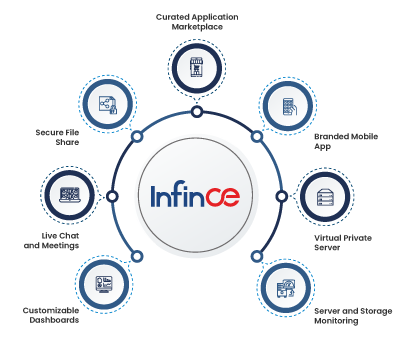
                          Infince is the only true digital workplace orchestration platform ever built. It is a one-of-a-kind solution that offers all the collaboration and productivity tools and the technical infrastructure an organization needs. 

                          Leveraged effectively, organizations can use Infince to turbocharge their workflows, deliver better, and achieve improved innovation within the organization.

                          Let’s check out how.

                          1. Cloud-based infrastructure

                          Infince offers a fully cloud-based ecosystem for its extensive list of productivity and collaboration tools. It allows employees to access these tools anytime and from anywhere in the world, on a device of their choice. Further, the model also supports real-time file sharing, allowing teams and individuals to share documents through secure access systems. This avoids delays that can arise by relying on the manual transfer of files.

                          2. Easy tracking and analysis

                          Infince enables business leaders to efficiently monitor and review business metrics through personalized dashboards and data visualization tiles. In addition to a whole host of pre-built standard tiles for monitoring information, it allows for customized tiles for specific requirements like monitoring servers, apps, and even employees. These insights can help leaders make faster decisions and resolve problems faster. 

                          3. Security

                          Digital security is a significant point in today’s work environment, especially when talking about a digital workplace model. Infince takes this into special consideration by protecting all data stored within its infrastructure with the latest cybersecurity protocols. Everything is stored securely on virtual private servers with advanced firewalls. In addition, smart access control systems permit only the right people to access or edit files. 

                          4. Comprehensive and Extendable 

                          If the digital workplace system is not capable enough or extendable for everyone’s use, an organization-wide adaptation may be impossible. This means that you risk going from individual silos to department-based silos. This is where Infince stands out. It comes packed with a whole host of productivity and collaboration tools. It ranges from the software to edit documents and spreadsheets to email clients and servers and much more. Further, the platform’s unique infrastructure makes it highly extendable – businesses can remove old applications and add in new software or SaaS options from other vendors.

                          Through this discussion, it’s easy to see how greater collaboration is directly proportional to better productivity and project management.

                          A powerful and effective digital workplace orchestration platform like Infince with its suite of productivity and collaboration tools can do wonders for your project workflows. There’s no better way to empower your teams.

                          Chat with our expert to learn more about Infince. 

                          Currently leading and managing a highly talented group of developers to produce an unmatched futuristic complex cost effective cloud product which can compete with technology giants.

                          More posts by Ishaque Valasseri

                          Related Posts

                          Top 10 Alternatives to Microsoft Teams that Aid Remote Work in 2023 and Beyond

                          Ever since the pandemic brought in the dynamics of remote work and hybrid models, Microsoft Teams has become a household…Read More

                          Merits and Demerits of Digital Workplaces – A Sneak Peak

                          Digital transformation is essential to your businesses primarily because it enables effective and efficient management of all your resources, be…Read More

                          How Infince Online Collaboration Tool Helps Achieve Your Business Goals

                          How Online Collaboration Tool Like Infince Help Define Your Business Success Online collaboration tools are a vital business asset today.…Read More

                          6 Key Trends Reshaping the Way Social Intranets Work

                          Social intranet platforms have become indispensable for businesses, facilitating communication, collaboration, and knowledge sharing among employees.  Picture this: a dynamic…Read More

                          Popular Posts

                          • Tackling Top 10 Technology Challenges of Small Businesses
                          • Major Web Hosting Challenges and Solutions
                          • Effective Work From Home Tips – Infographic
                          • How Intranets Solve Workplace Challenges
                          • 10 Key Factors to Consider While Choosing An Intranet Platform

                            Stay up to date on the latest in Digital Workplace Trends


                            Manage your entire business from one place with the complete cloud platform InfinCE.

                            Request a Demo

                            How Can Organizations Profit More from Collaboration Software?

                            • Small Business
                            • Technology
                            • Business Software

                            Every business faces two types of challenges – the challenges from within and the challenges from outside. If you could make your employees satisfied, motivated, and excited to work, many internal issues would be solved even before they arise. One such internal challenge is Employee Engagement! Studies have found that more than half of the employees are uncomfortable with their workplace; hence they are not wholly focused on their work. But employing business collaboration software can resolve these issues.

                            An innovative all-in-one collaboration platform like Infince can minimize all workspace-related issues and motivate your employees to work more eagerly and enthusiastically. The most attractive side of Infince business collaboration software is that it lets you unify the entire workforce and brings together all of them to strive for a common goal. 

                            Below explains what you should consider when looking for a perfect team collaboration solution for your business.

                            Read more: A Guide to Improving Workplace Collaboration for the Modern Enterprise

                            Criteria for Choosing Collaboration Software

                            As there are numerous business collaboration platforms out in the market, entrepreneurs often find themselves in a dilemma when choosing one that will benefit their organization. Apparently, there are many things to be considered to ensure effective integration of the software in terms of its cost, output, and scalability. Some of the key features an ideal business collaboration solution should include are:

                            1. Advanced Communication Options

                            The primary goal of any business adopting a collaboration platform is to ensure streamlined communication among the employees. Therefore, integrating communication features like instant messaging, audio/video calling options, private and group chat options, etc., into the application makes it a perfect fit.

                            Different companies have different policies when it comes to communicating within their company. They may even change their communication policies from time to time. For example, some prefer emails, while some others may rely on audio/video conferences. Some may also use multiple communication channels for different employee hierarchies, such as video conferencing with top-level management and audio calling for others.

                            It is important to keep a tab on these aspects before you finalize a collaboration software for your company. Additionally, it is also essential to check the compatibility of the software across multiple types of devices – PCs, tablets, and smartphones to ensure it improves employee engagement.

                            2. File-Sharing Tools

                            Conventional file sharing via email has many drawbacks, and it even exposes the data in emails to cyber threats. Besides, as more and more emails with attachments pile up in the inbox, it would be pretty challenging to find the required data when you need to pull out something quickly before a meeting. However, in a modern business collaboration software like Infince, there are many user-friendly options for file sharing, which make it all effortless.

                            For instance, you can quickly share the link to a file stored in the cloud storage of Infince while at a conference. It allows the other team members to access the file and relevant data quickly. It is even possible to set user-level permissions on the files to limit the access to sensitive data for the top management. 

                            Often, it is quite a nuisance to download a file from one cloud storage space and upload it into the collaboration tool again or upload a file from the local device when you are in a virtual huddle. However, it will never be the same when you use the Infince collaboration platform for your business.

                            3. Event Management Solutions

                            Meetings and conferences are quite common in a modern business organization. However, keeping all the members informed about a scheduled meeting, getting their participation confirmation, and coordinating the events is no cakewalk. Business collaboration software plays another significant role here by giving you a streamlined calendar.

                            The integrated calendar in Infince allows you to keep track of all the upcoming events from a single dashboard. You can share the calendar with the team members to keep everyone in the organization informed on what is going on in the company, even if they do not need to participate in all planned events.

                            Read more: How Infince Online Collaboration Tool Helps Achieve Your Business Goals

                            4. Support Services

                            While moving to a new working ecosystem of collaboration software, we are bound to have many questions. Getting everything on track will take time and requires assistance for the same. With Infince collaboration software, you will not face any issues because it offers round-the-clock technical support services via three modes – email, chat, and phone. Be it a simple requirement or a complicated problem, you can reach out to the tech support team to resolve things quickly.

                            Another benefit of having dedicated support for your collaboration platform is that it flattens the learning curve. There could be many features that you are unfamiliar with and may not have someone to guide you through them. With 24/7 support, you can master the functions of your business collaboration tool in no time.

                            5. Security Features

                            Before you choose your collaboration tool, you need to find out the level of security it offers. Does it speak about the security policies, the precautions users need to take, and remedial actions to observe in case of adversity? 

                            When using a top-level collaboration tool like Infince, the admin is entrusted with huge responsibilities to ensure the security of the software. However, the software itself can provide high security only if a well-informed admin monitors the processes from time to time. That is where Infince delivers a unified dashboard to help the system and network admin track the security of the tool. At the same time, it also allows assigning roles and integrating security features like two-factor authentication and secured sign-in options to evade risks. Above all, you can count on the transparency of Infince for all your security concerns.

                            Watch: How Infince’s Collaboration Apps and Productivity Tools Helps Businesses Gain a Competetive Edge!

                            How Can You Benefit from Using Business Collaboration Software

                            When great minds work together for a common goal, the result will be amazing. Business collaboration software creates a space for improved cooperation and lays the stepping stone for achieving impeccable results. Moreover, with effective collaboration among the workforce, the time required for realizing the goals becomes shorter. It eventually translates into business growth and the overall profitability of the company.

                            Apart from breaking the barriers to business growth due to lack of communication among the workforce, a reliable all-in-one collaboration platform also paves the way for better scalability. When you can monitor all the resources, experiences, finances, and infrastructure from a unified dashboard, it is easy to proactively tackle any challenges and make effective problem-solving decisions. What’s more, when you ensure optimal employee engagement and productivity, you can explore modern markets, build new relationships, and invest in diverse market structures.

                            Collaboration is an integral part of every business’ success. The above-discussed points highlight how business collaboration software promotes employee cooperation and satisfaction in today’s new world order. Superior innovation, productivity, and efficiency are guaranteed when you integrate a modern collaboration tool like Infince and utilize its features to the fullest. Connect with our experts today to know more about Infince, or just Sign Up 30 days free trial to explore!

                            Currently leading and managing a highly talented group of developers to produce an unmatched futuristic complex cost effective cloud product which can compete with technology giants.

                            More posts by Ishaque Valasseri

                            Related Posts

                            INFINCE Presents A Technology Guide For Small Businesses

                            District Hall, 75 Northern Ave., Boston, 6pm April, 2019: On 4th April 2019, INFINCE is sponsoring a free workshop targeting…Read More

                            5 Ways VPS Hosting Offers Your Business a Competitive Advantage

                            Gain a Competitive Edge with Virtual Private Server Hosting Virtual Private Server or VPS hosting refers to a platform that…Read More

                            Why Does Your Business Need An Intelligent Digital Workplace?

                            A digital workplace is an integrated platform with capabilities to deliver and manage all the apps and data of your…Read More

                            Becoming Small Business Leaders In 2020: What You Need To Know

                            5 Tips for Small Business Leaders to Stay Ahead of the Game in 2020 It is quite easy for a…Read More

                            Popular Posts

                            • Tackling Top 10 Technology Challenges of Small Businesses
                            • Major Web Hosting Challenges and Solutions
                            • Effective Work From Home Tips – Infographic
                            • How Intranets Solve Workplace Challenges
                            • 10 Key Factors to Consider While Choosing An Intranet Platform

                              Stay up to date on the latest in Digital Workplace Trends


                              Manage your entire business from one place with the complete cloud platform InfinCE.

                              Request a Demo
                              infince logo
                              awards awards awards awards
                              Terms and Conditions Privacy Policy

                              Company

                              • About Us
                              • Pricing
                              • Request Demo
                              • Why Infince
                              • Contact Us

                              Contact

                              • [email protected]
                              • +1-833-463-4623

                              2025 Infince. All rights reserved by Fingent. Infince is developed and supported by fingent logo